From its first release in 1982 the Act Sirius 1 and Victor 9000 has undergone at least two revisions and upgrades to the ROMs fitted in the computer from Victor themselves and one from a third party company called 'ISSUE' who were based in Holland.
The ACT Sirius 1 or Victor 9000 could be fitted with up to 16Kb of boot ROM. When the CPU 8088 is reset or powered on, the the CPU looks into the highest memory area and begins to execute code in the boot ROM. The boot ROM performs basic initialisation of all hardware in the machine. It then tries to read the boot software in the disk drives. Floppy drives first and if a hard drive is fitted second whichcontains the operating system. The boot software is loaded into the processors system random access memory (RAM). When this process is completed, the boot ROM jumps into the operating system and begins executing the operating system.
Here is a complete description of how the above takes place in real time.
The Boot ROM's on the Sirius/Victor perform no more than the "booting-up" or loading of the operating system from disk into memory, abd doing that operation as part of the process.
Access to disk routines are providedin the Bot ROM.
CPU registers are saved in low memory prior to memory test. Low memory from 0 to 0ffh is not tested or cleared.
The boot ROM loads from the diskette the resident operating system from a description contained on track 0 secter 0 of the diskette.
The sequence is:
| 1 |
Disable interrupts |
| 2 |
Clear the CRT controller |
| 3 |
If a memory test of the first 16k of memory fails the halt the boot. Else set the first 16k of memory to zero |
| 4 |
If a test of screen RAM fails then halt the boot. Else set the screen RAM to zero |
| 5 |
Load the character set into the dot matrix |
| 6 |
Initialise, clear and set to high intensity the CRT |
| 7 |
Turn on the arrow display |
| 8 |
Initialise the diskette and display the diskette image at middle of the screen |
| 9 |
Turn off all disk drives |
| 10 |
Select drive A |
| 11 |
If a drive door closes, select that drive as the boot disk otherwise every 32nd time blink the arrow display |
| 12 |
When a drive has been selected then turn off the display and turn on the disc drive motor |
| 13 |
Read a header record from track 0 sector 0 and if an error go to the disk error output |
| 14 |
Otherwise display the clock and memory determination icons and test for end of memory |
| 15 |
Save the memory size for comparision with system requirements and display on the CRT with the clock off |
| 16 |
Turn the clock on and read diskette definiations and if disk read error occurs report it via the disk disk display |
| 17 |
Check the disk label and if invalid go to the 'not a system disk' error display |
| 18 |
Bring the disk online with all the disk parameters loaded |
| 19 |
Compute the parameters to load the system and then load the system into memory. After successfully loading it transfer to the system via a programmed interupt 225 |
| 20 |
On the event of a reportable error display it then wait for the disk door to open at which time control is passed to 6 above |
Originally there could be fitted either one 8kb or two 4Kb boot ROMs. They were fitted into DIL sockets on the main board near to the 8088 CPU in socket numbers 7H and 5H. Socket 7H is the high ROM or "FF" and socket 5H is the low ROM or "FE". If only one 8Kb ROM was fitted it would be in the socket 7H.
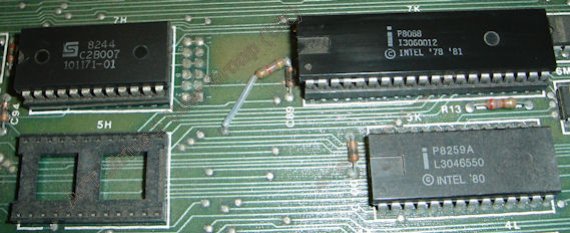 Single ROM shown top left in socket 7H
These stayed current for some time as there was no need to alter the code within as there were no alteration or upgrades to the main components and were designed to function with either MS-DOS 1.25 or MS-DOS 2.11 and CP/M-86.
Victor released the universal ROMs in 1984 to allow the use of MS-DOS 3.X and to improve instruction code. These ROMS came in two 4Kb 24 pin DIl (Dual in Line) packages to fill both the FE and FF ROM sockets on the main board. To use these certain alterations to links on the main board next to the ROM's needed to be carried out. Links either needed to be cut or added to make the ROM's function. In the event of a return to a single ROM then the links need to be changed back to the original configuration i.e. the reverse of that listed.
A full information sheet can be found HERE.
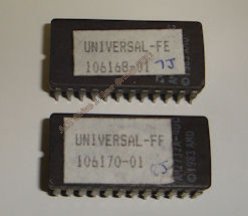
Victor Universal ROM's. |
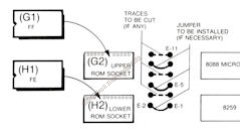
Link changes only required if
one ROM fitted previously. |
A major upgrade to the Sirius/victor ROM's were carried out by 'ISSUE', a company based in Holland in the late 1980's and early 1990's. They upgraded the ROM's to display boot information, on the monitor as well as memory size, errrors or if all is well a PASS. There is also enough code in the ROM to output errors to a dot matrix printer connected to the Centronics port in the event of a serious system errors at boot time.
The two ROM's consist of either a pair of 2732 or 2732a EPROMS. These ROM's are ideal for all Sirius/Victor machines using CP/M or MS-Dos 1, 2, 3 and all hard drive sizes such as 10Mb, 20Mb or 30Mb drives. If there is only one ROM fitted the informatiom relating to link changes is the same as the universal ROM's.
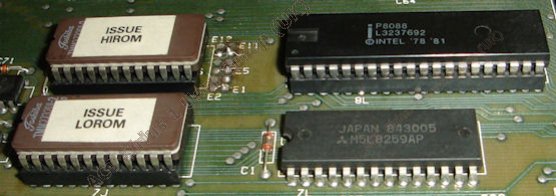
ISSUE published two information sheets on the ROM's including installation and what to expect from them.
Information sheet 1 can be found HERE.
Information sheet 2 can be found HERE.