Keyboard

DISMANTLING 3

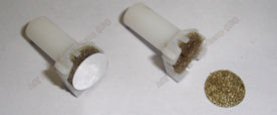
The key plunger is the business end of the keyboard. When the key is pressed the plunger is pushed down, the foil makes contact with the PCB and the circuit is made. The foam actually cushions the key press and ensures the foil makes full contact across the PCB contact points.
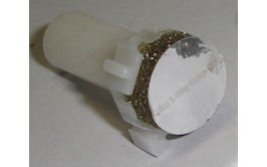
The foam and foil cushion is made of three parts. A foil disk, a foam pad and a clear plastic disk glued together. The plastic disk is held on the key plunger by four tiny clasps.
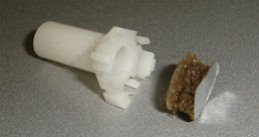
Inspect the foil and foam on the end of the key plunger. If it looks similar to the image on the left then it should still be up to its job. If it looks similar to the image on the right the foam has perished completly and the foil has become detached or the foam looks to be distressed then it is in need of repair (see page 4).

If all the key plunger assemblies with its foam and foil pads are in good condition then re-assembly can take place in the reverse order to dismantling with a slight differance. Ensure all parts are dry and dirt free.
Assemble the Keytronic/plungers as described below. Do not replace the springs or keys at this point. With the metal key frame the right way round press in all Keytronic units and blanking pieces with the keytronic name at the top of each unit press them into the holes in the frame. Note that the 'Enter' key unit is orinentated 90° to the rest of the Keytronic units. Refer to the photographs or notes taken in the early stages of dismantling to see where the blanking plates are located.

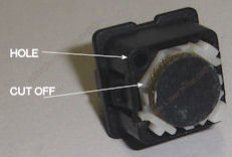
To assemble the key plunger into the Keytronic housing it is important to correctly orientate the plunger. The cut off corner goes adjacent to the corner with the hole in the Keytronic housing. Align the plunger and gently push. A 'click' may be heard. Do not put pressure on the foil and foam to do this but rather push the edges of key plunger itself. A small screw driver may help.

When all the keytronic units are in place in the key frame place the unit on a flat surface with the foil, foam side down. Place a spring over each Keytronic unit ready to receive a key. Refer to your photographs or notes for the correct layout and select the appropriate key for each position. The keys are scultured to the correct angle when fitted so it is best to start with keys that can only be inserted on way such as 'Q', 'R', 'D', 'K', 'C', 'M' etc. This will demonstrate the correct orientation i.e. slope of the key, of the other keys such as 'O', 'H', 'X', 'N' etc. The function and formatting keys are self explanatary.

Locate the key on its key post and with the spring fitted push the key down. It will also 'click' into place. The key should be free in its movement up and down. Repeat until all the keys are fitted as per your photographs or notes.

All that remains is to fix the unit into the case and use the keyboard as before but knowing it is now clean and in good working order.
Page:  1  2  3  4 


Last Update 15/04/2011