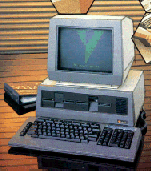
Attaching a mouse to a Sirius computer is fairly straight foward but there is not a lot of software written for the ACT Sirius 1 that actually uses a mouse. The art package 'Picasso' is one application that takes full advantage of a mouse, and of course, you will also need a mouse driver.
There are two ways that mouse attachment can be achieved either by making an adapter i.e. 25 pin male to a 9 pin male that will allow using a standard serial mouse or to directly attach a 25 way male to the standard serial mouse wire. Both require a good level of manual dexterity, and a certain amount of skill with a soldering iron.
The table below shows the pin to pin connections for the adapter.
9 PIN MALE
CONNECTOR |
SIGNAL
FUNCTIONS |
25 PIN MALE
CONNECTOR |
3
2
7
5
|
TD
RD
RTS
SG
|
2
3
4
7
|
Only the four conections are necessary. Do not link any other pins.
List of parts required:
- 9 way MALE "D" type connector + plastic hood to match.
- 25 way MALE "D" type connector + plastic hood to match.
- Short length (100mm) of 4 core cable.
Remember a MALE connector has pins. A FEMALE connector has sockets.

Sirius 1 Mouse Adapter
To connect a 25 way "D" type connector directly to the mouse cable first determine the colour coding of the mouse cable wires in relation to the pin designations of the existing mouse plug.
When you are sure all is correct cut off the 9 pin plug. Trim the wires within the cable and solder on the 25 way"D" connector refering to the table above.
Note: The information above is used at your own risk and implies no warranty as to its suitability. No responsibility can be accepted for any accidents or injuries as a result of using the information. Any damage to your computer is your responsibility. All liability rests with you.