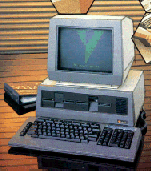
File transfer between computers of differing types is an issue that most people do not even attempt. It is in fact a simple operation once you have assembled a direct connection cable to link the computers together. This page will show you how to do this so you can transfer all manner of files, both ASCII and binary between a Sirius 1 and a PC and back again. With the addition of a couple of gender changers connections between between both 25 way 'D' connectors and 9 way 'D' connectors on a PC is possible. You can also connect two Sirius computers together or other computers such as the ACT Apricot Xi. When you have completed your cable with the aid of comms software such as CrossTalk or Kermit etc you soon be transfering files.
The first step is making a cable suitable for the serial transfer. To do this a short length of 10 core cable about a metre long and two 25 way 'D' connectors, one MALE (Sirius end) and one FEMALE (PC end) are required. A MALE connector has pins. A FEMALE connector has sockets. Some knowledge of soldering is needed as is a certain level of manual dexterity.
The table below details the basic pin connections required. Be sure to follow the table exactly and check often to make sure all the connections are correct. It is very difficult to make adjustments when the cable is complete.
Male end
CONNECTOR |
|
Female end
CONNECTOR |
1
2
3
7
5
8
20
|
-------
-------
-------
-------
--| |--
--| |--
--| |--
|
1
3
2
7
5
8
20
|
Pins 5, 8, 20 are connected together within their respective ends only.
Maplins or Tandy stock a range of gender changers that will adapt the cable for most applications
Note: The information above is used at your own risk and implies no warranty as to its suitability. No responsibility can be accepted for any accidents or injuries as a result of using the information. Any damage to your computer is your responsibility. All liability rests with you.